
Services · Bot & AI Voice Agent
Bot & AI Voice Agent
An automated voice agent that answers inbound sales, support and account calls out of office hours and at peak times. It captures what the caller needs, confirms the details and creates the lead, callback or support ticket in Salesforce, with no human agent involved.
- Amazon Connect
- Amazon Lex
- AWS Lambda
- Amazon Bedrock
Why teams add a voice agent
Self-service for sales and support
It handles sales calls and sends the right forms and links for returns, claims and billing.
No missed opportunities
Leads and support requests are captured 24/7, without human agents.
Shorter waits at peak times
When every agent is busy, the voice agent answers instead of a long queue.
Clean data in your CRM
Validated details are filed in the right place, and automated emails cut manual admin.
When the voice agent answers
It works as a first line out of hours and a second line when your team is at capacity.
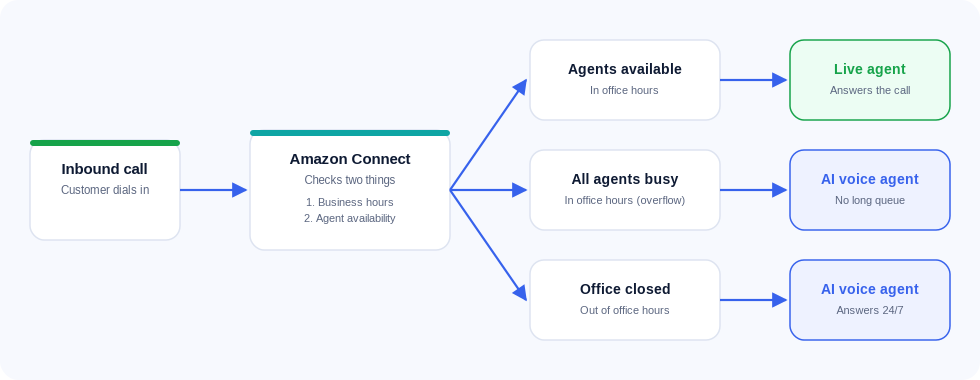
Out of office hours
Every inbound call is routed straight to the voice agent.
Inside office hours, on overflow
If a customer calls while all live agents are busy, the call goes to the voice agent instead of an extended queue.
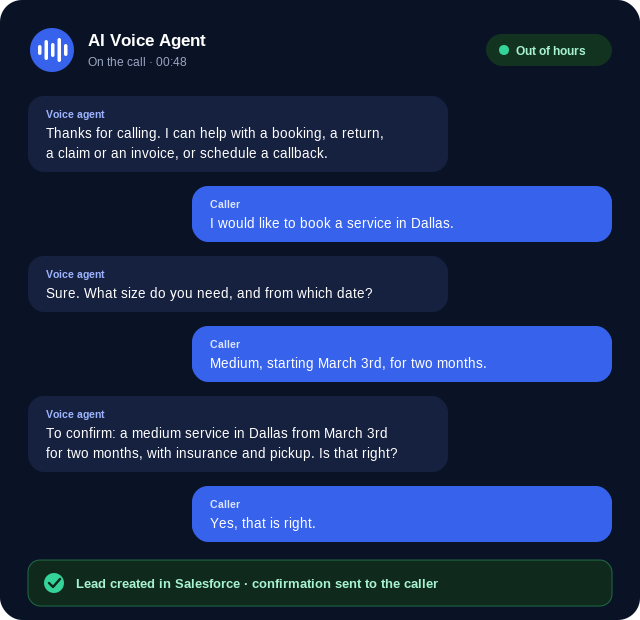
Either way, the bot talks with the caller, identifies the need, collects the details, offers a callback, confirms the information and creates a qualified ticket for your team.
What callers can do
The Amazon Lex bot has a separate intent for each customer journey.
Book a service
For new sales inquiries. The bot asks about location, service size, duration and add-ons such as insurance and pickup. Amazon Bedrock turns the answers into a natural summary, the caller confirms, and a lead or opportunity is created in Salesforce.
Schedule a callback
Available at any point in the conversation. The bot captures the caller's phone number and adds it to the callback queue for a human agent.
Return items
For existing customers, the bot emails the return form to the address on file and confirms. For new callers, it asks for an email address and sends the return link.
File a claim
Existing customers get the claim form at the email on file. Callers who are not recognised give an email address and receive the claim link.
Ask about an invoice
The bot sends the invoice link to the email on file, or asks for an address first when the caller is not an existing customer.
Something else
If the bot cannot understand the request, it re-prompts and then offers a callback, so no caller is left stuck.
How a call flows
- Call arrives
Amazon Connect checks the time and live agent availability.
- Voice agent picks up
Out of hours, or when all agents are busy, the call routes to the AI voice agent.
- Intent is identified
Amazon Lex greets the caller and routes them to booking, callback, return, claim or invoice.
- Details are captured
Lex collects the data for that use case. AWS Lambda validates it in real time, such as customer status and the email on file.
- Caller confirms
The bot reads back the summary or the proposed action. For bookings, Amazon Bedrock writes the summary.
- Action is taken
Emails are sent or Salesforce is updated, and the call ends with a tailored confirmation.
Architecture
Built on AWS services in your own account, with Salesforce as the system of record.
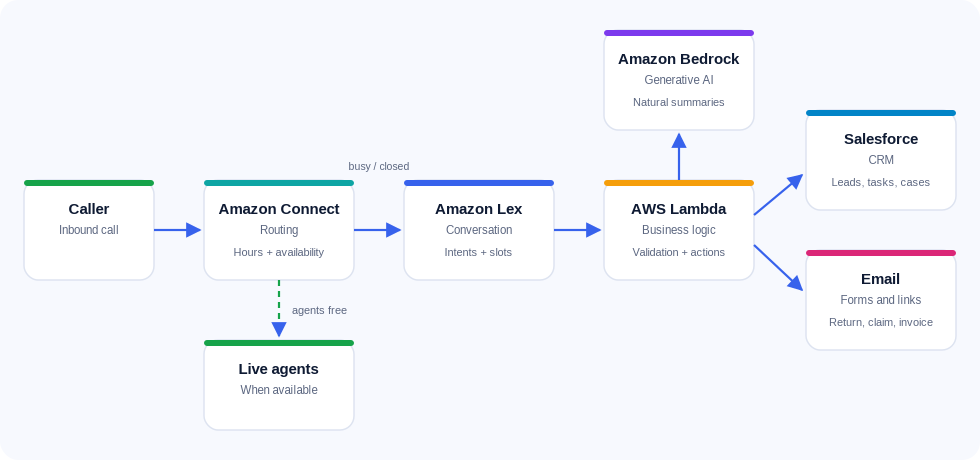
Amazon Connect
The cloud contact center. It receives inbound calls, routes them by business hours and agent queue status, and invokes the voice agent contact flow.
Amazon Lex
The conversational AI engine. It manages the intents, the dialog flow, extended slot capture times and fallback handling.
AWS Lambda
Business logic and real-time validation. It checks customer profiles, triggers emails with links and forms, and updates records.
Amazon Bedrock
Generative AI with a speech-to-speech (STS) model approach. It improves speech quality and writes human-readable summaries for confirmation.
Salesforce
Receives the confirmed data and creates leads for sales, tasks for callbacks and cases for support.
Data the voice agent captures
| Use case | Details captured |
|---|---|
| General and sales | Customer name, phone number, email address, city |
| Service booking | Service size, start date, duration, insurance (yes/no), pickup and delivery (yes/no) |
| Callback | Phone number |
| Returns, claims and invoices | Customer status (existing or new), email address |
Built to handle real calls
Routing and conversation
- Intelligent routing and overflow. Amazon Connect flows check business hours and real-time agent availability, and fall back to the bot when the queue is full.
- Natural prompts and longer timeouts. Greetings present clear options, and callers get more time to speak.
- Callback everywhere. "Schedule a callback" is offered in the greeting and is the fallback in out-of-hours and overflow calls.
- Error handling. Fallback intents catch invalid input, silence and unclear speech, then re-prompt or move to a callback.
Confirmation before action
- Confirmed: AWS Lambda updates Salesforce or sends the email.
- Denied or changed: Amazon Lex asks again for the incorrect fields, such as the email address.
- Repeated failures: the bot switches to the callback intent to avoid frustrating the caller.
Common Questions
When does the AI voice agent answer calls?
Out of office hours, every inbound call goes to the voice agent. During office hours it answers when all live agents are busy, instead of leaving the caller in a long queue.
What can callers do with the voice agent?
They can book a service, schedule a callback, return items, file a claim or ask about an invoice. The bot captures the details, confirms them with the caller and creates the lead, task or case in Salesforce, or emails the right form or link.
What happens if the bot does not understand the caller?
Fallback handling catches silence, invalid input and unclear speech, re-prompts the caller and then offers a callback so nobody is left stuck.
Which AWS services does it use?
Amazon Connect for call routing, Amazon Lex for conversation, AWS Lambda for validation and actions, and Amazon Bedrock for natural-sounding summaries. Confirmed data goes to Salesforce.
Related services
Let's talk about your contact center.
Tell us what you run today and what you want next. An Amazon Connect expert will reply with honest next steps.